From research to build‑ready, in one workspace.
One AI-native workflow for research, strategy, PRDs, and wireframes with an assistant that shows its work.
Product teams lose context switching between research tools, docs, and design files - decisions drift away from the evidence behind them.
One workspace that carries context from research through strategy, PRDs, and wireframes - with the human deciding at every step.
One workspace, on every screen you work from.
The product process is scattered across tools that don't talk.
Research lives in one tool, decisions in another, designs in a third. Every switch drops the thread - teams described "starting over" several times a day.
Writing them takes days and they age the moment they ship. Maintaining them was the most-avoided task in every team we spoke with.
Strategy, design, and engineering each hold a slightly different version of what was agreed and nobody can trace decisions back to evidence.
The bet, and how we'd know it paid off.
If context stays connected from research to handoff - and the AI always cites its work - then teams will trust the assistant, stop re-doing lost research, and ship documentation that never drifts from the evidence.
Research → PRD → wireframe without leaving the workspace.
Every insight linked to at least one downstream artifact.
Every AI output carries sources, a confidence label, and an approval step.
What nine interviews changed about the design.
Semi-structured interviews with PMs, designers, and founders in week 1. Each finding below is paired with the decision it produced.
Teams don't lack research - they lack recall. Existing findings rarely resurface at decision time.
Decision: a research hub that resurfaces itself — insights attach to personas, PRD sections, and wireframes automatically.
An assistant that guesses loses trust instantly. Participants forgave slow answers, never invented ones.
Decision: sources and a confidence label on every AI output. No citation, no claim.
Nobody wants AI to finish the job. People wanted drafts to react to - and to stay the author of record.
Decision: AI drafts, humans approve. Every generated artifact lands as an editable draft behind an explicit accept step.
Plenty of AI tools. None that keep product context.
The market generates screens and text well, but forgets the project the moment you switch tools. That gap - persistent, cited context - is the opening.
Inside the head of a product designer.
Synthesized from the interviews - what our primary user says, thinks, does, and feels while moving an idea toward build.
“I don't want to repeat the same work.”
“I need AI that understands my project.”
“Most of my time goes to organizing work, not designing.”
“Am I solving the right problem?”
“Can I trust the AI output?”
“Which decision was this based on?”
Researches users and iterates on designs.
Collaborates with teams across several tools.
Reviews every AI suggestion before using it.
Overwhelmed by scattered, duplicated work.
Curious about what AI can take off the plate.
Time-constrained - every single day.
Three people the product is really for.
Assembled from the interviews, not invented - the designer, the PM, and the founder, each feeling a different edge of the same broken workflow.
“I don't want AI to design for me. I want it to hand me the evidence and a first draft.”
“By the time the PRD ships, half the team is working from a different version of the truth.”
“I don't have a research team - I need the tool to be my product brain.”
“When I start a new product, I want AI to understand my research, business goals, and design system - so it can generate relevant artifacts while I review and refine every decision.”
The designer's journey, discover to deliver.
Mapped across the five stages of a product cycle. The curve is the mood - it sinks through Plan, Design and Review, which is exactly where the product does its lifting.
A sitemap you can hold in your head.
Three levels, no deeper. An organization holds workspaces, a workspace holds six destinations, and a project holds every artifact - all linked through the knowledge graph so nothing is more than a hop away.
The core loop is a hand-off, not a hand-over.
The path from idea to build-ready, drawn as it actually runs - passing back and forth between the person and the assistant. The AI drafts; the human holds the gate.
One thread of context, six stages.
Pencil first, pixels later.
Every core screen started as a hand-drawn sketch. Layout and hierarchy had to work in pencil before anything earned colour, type, or an AI layer.
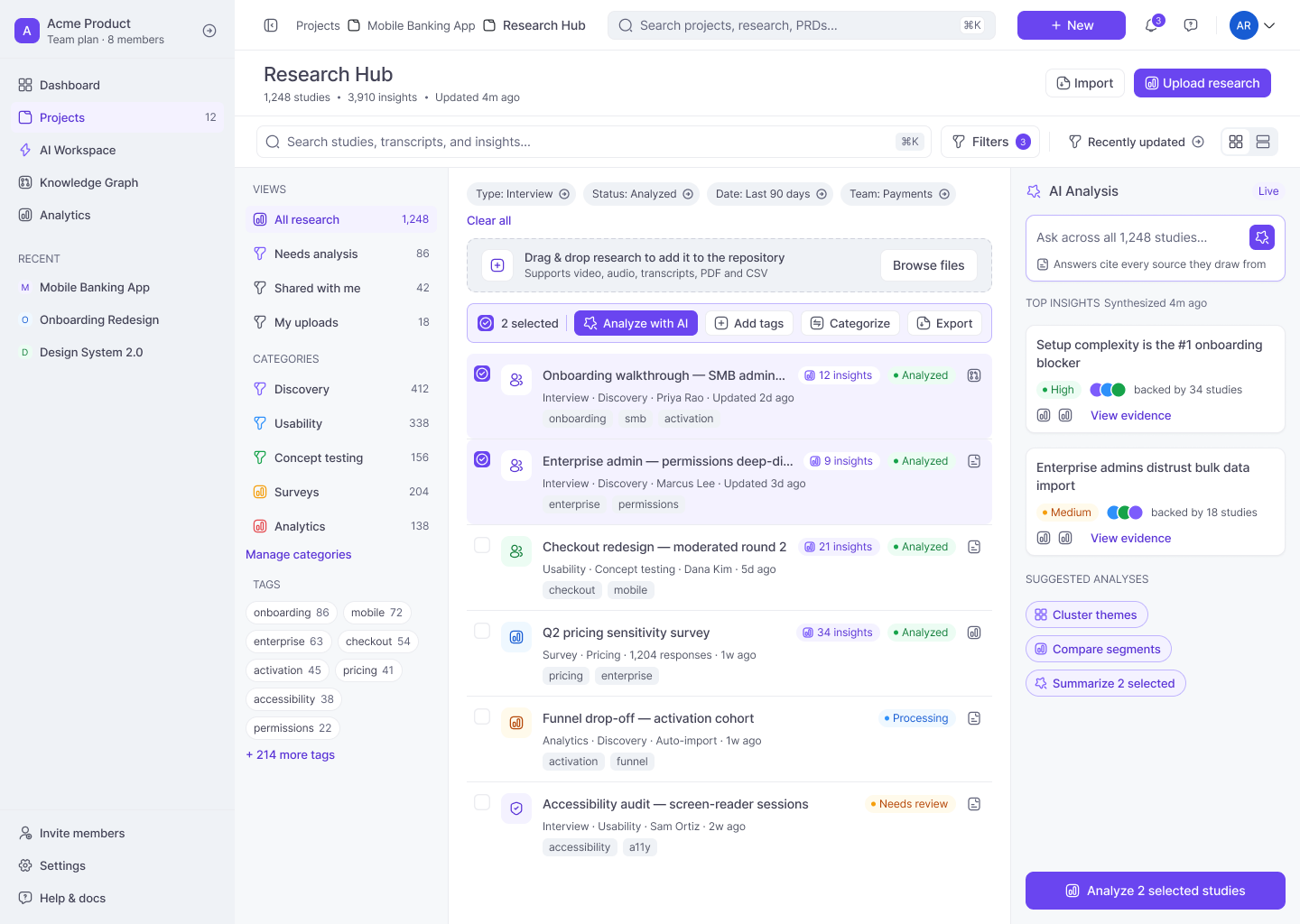
Research Hub : The three-column workbench - facets, repository, AI panel - was settled on paper. The final screen added source tags, status colour, and the AI theme summary that makes findings resurface on their own.
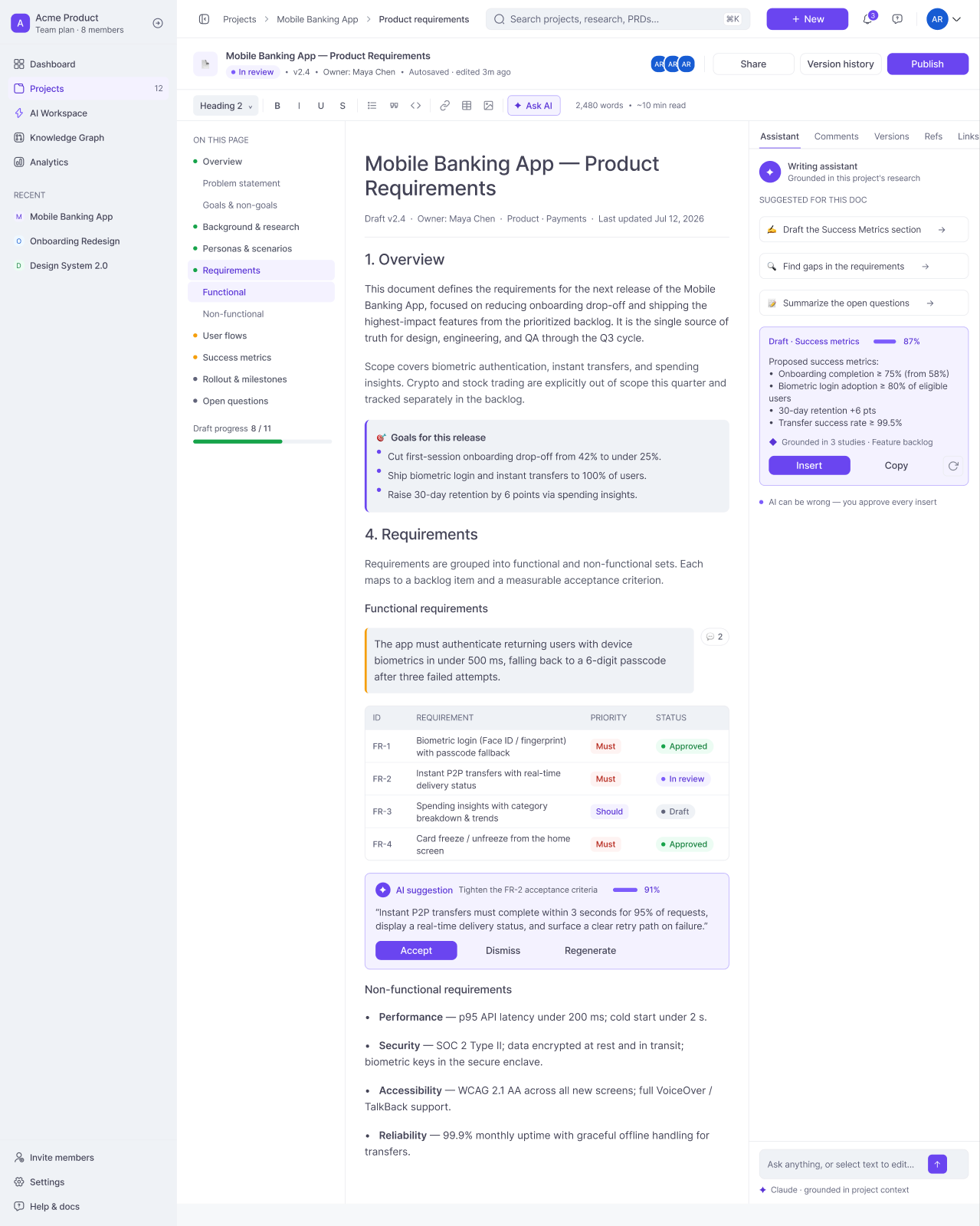
PRD editor : Same three-pane skeleton sketched first: contents, document, assistant. In the final UI the assistant drafts from linked insights and every claim keeps its source.
Three surfaces carry the whole workflow.
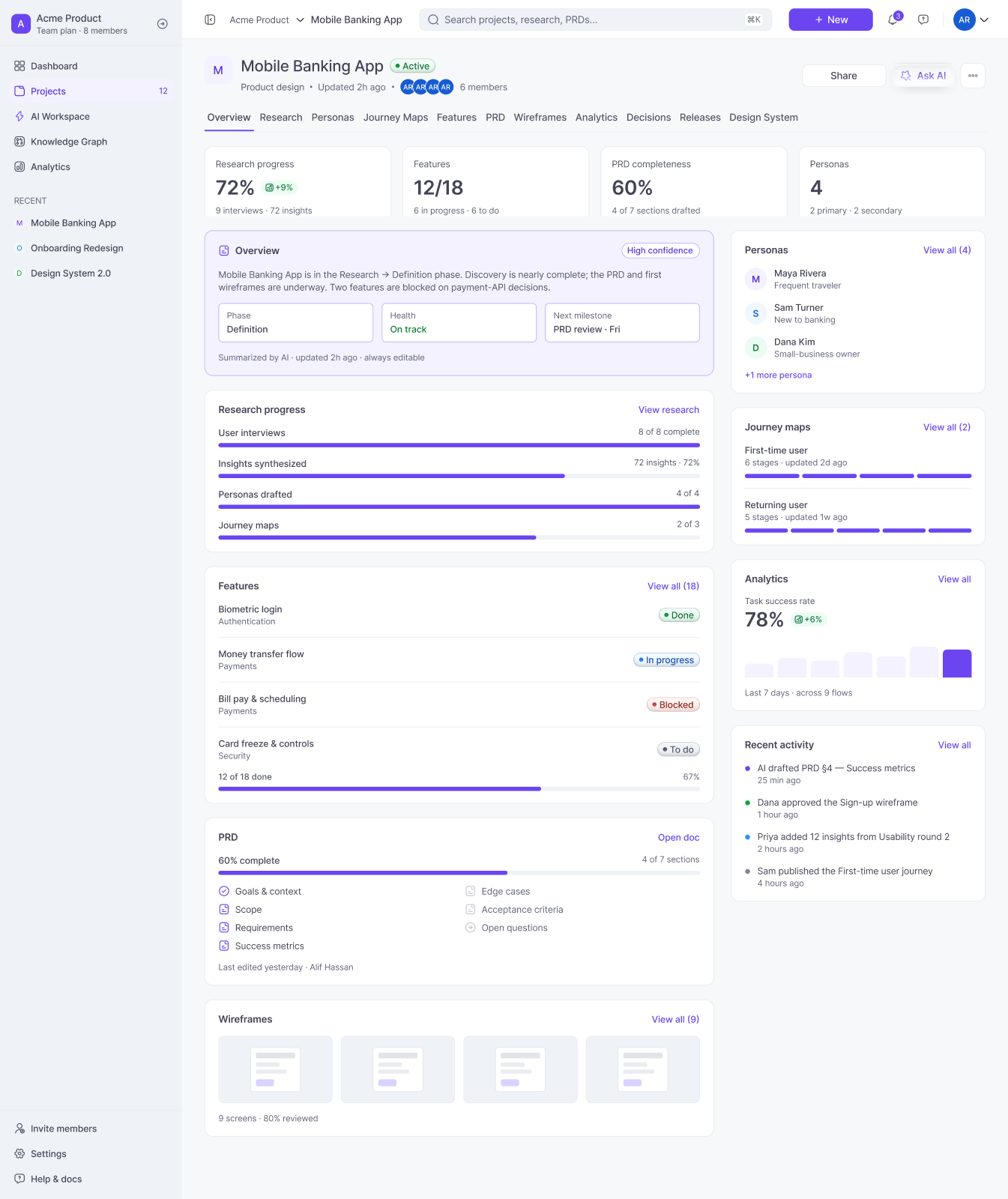
Project dashboard : One home per initiative - progress, recent artifacts, and AI suggestions that always name their evidence and wait for approval.
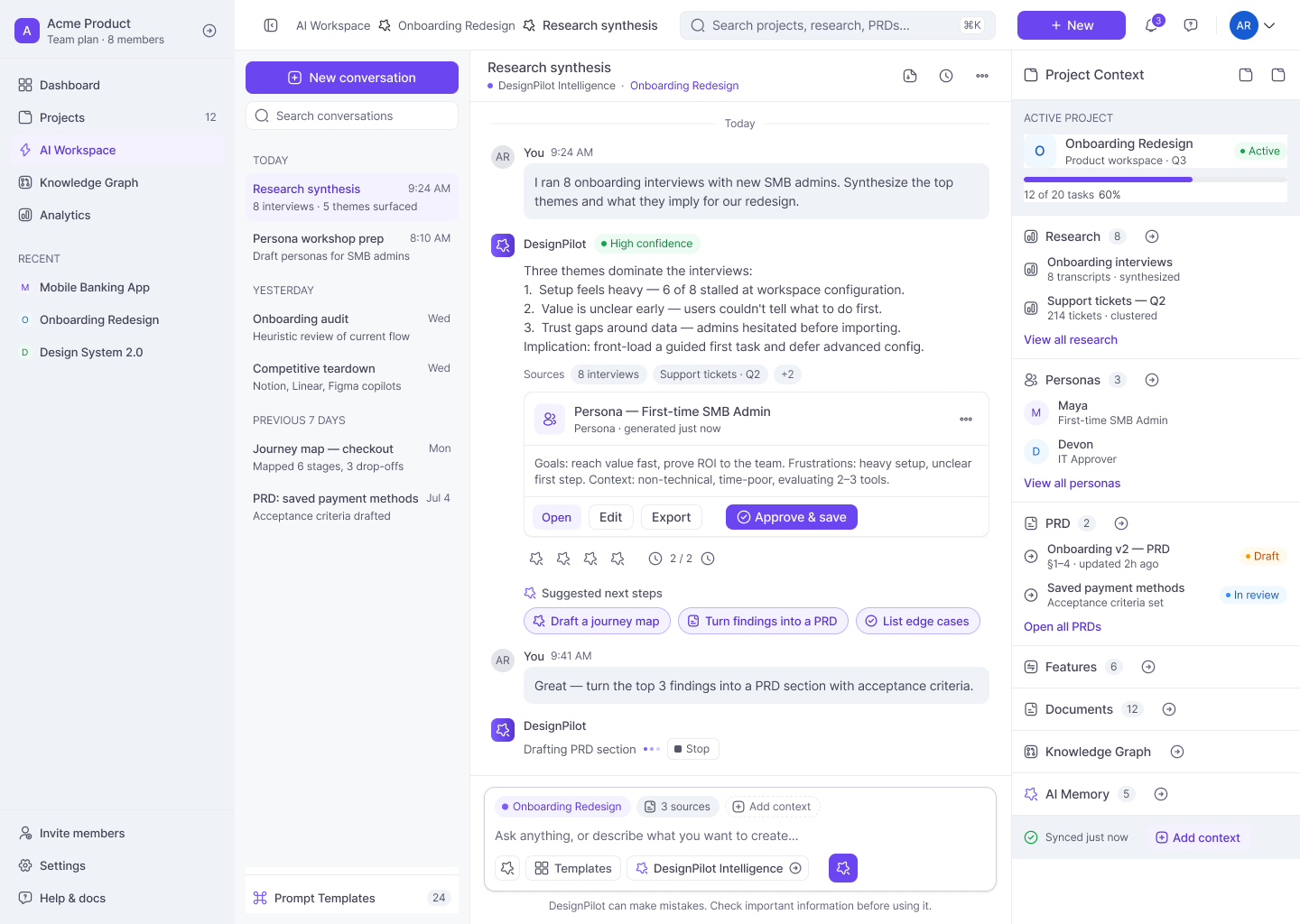
AI workspace : Every answer carries its sources and a confidence label, generated artifacts land as drafts behind an explicit approve step, and the context panel keeps the project's evidence one glance away.
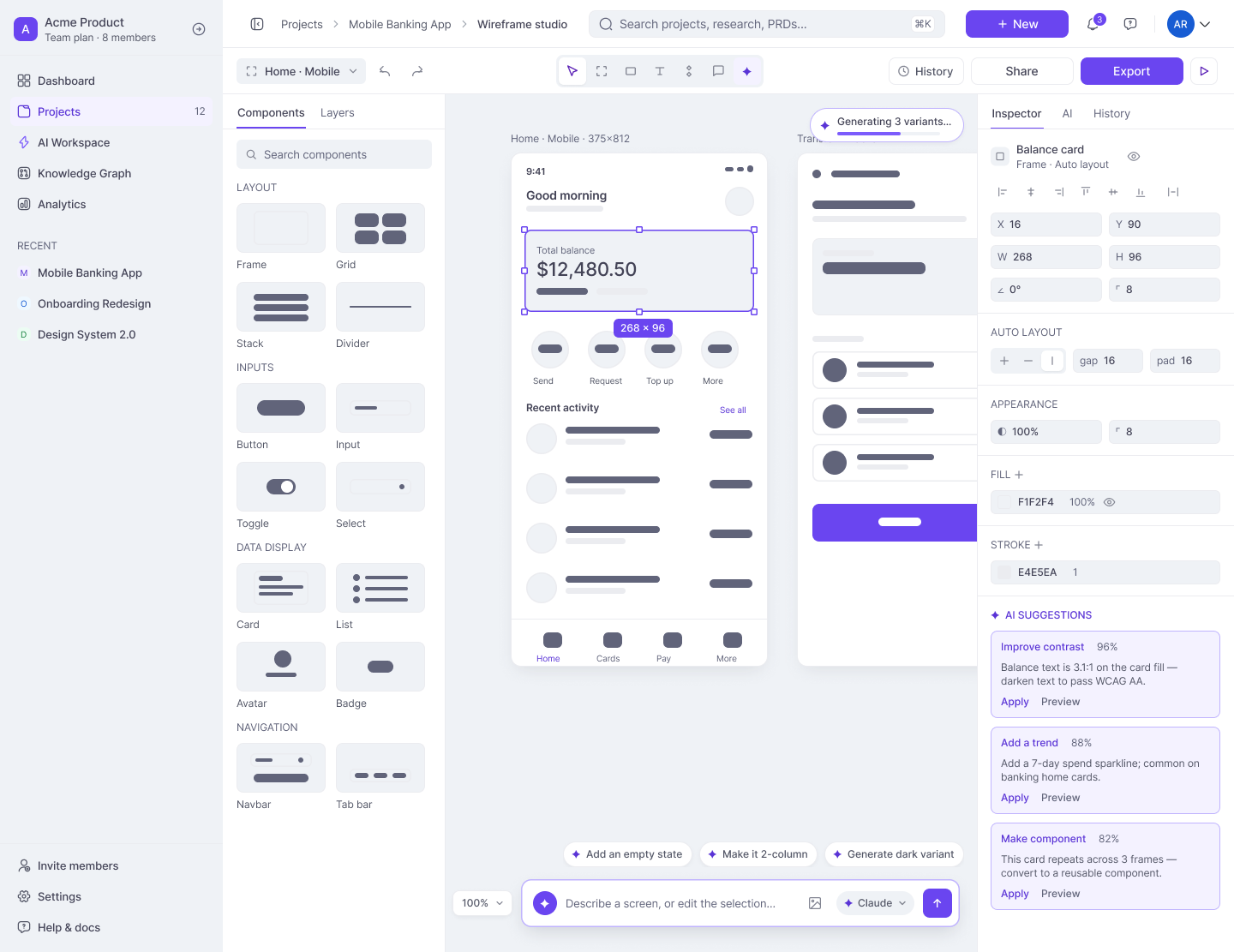
Wireframe studio : Screens generate from the PRD onto a real canvas — editable objects with version history and export, never flat images.
A copilot that earns trust by showing its work.
The product's whole bet is a calm, transparent assistant. Four rules govern every AI surface - each one came straight out of what makes people distrust AI.
Every claim names the interviews and documents behind it.
sources: P2 · P4 · notes.mdUncertainty is labelled, never smoothed over.
confidence: high · 6 of 9 sessionsNothing enters the record without an explicit accept.
draft → review → acceptedAI output is a starting point with full version history.
v4 · restore any versionIdle through failure — each state has clear feedback and a way to recover, so the assistant never leaves you guessing.
Tied to how many sources back an answer — and paired with the assumptions and limitations behind it.
Two hues, one typeface, everything tokenized.
Gray builds the structure; violet is spent only on primary actions and AI moments. 187 tokens resolve every color, space, and radius - in light and dark.
Eight steps each, plus five semantic roles. Every value is a token - no raw hex lives in a component.
One typeface, three weights, 18 named roles. Nothing in the product uses a size that isn’t on this list.
Every gap, pad and corner resolves to a token on the 4pt grid. Nothing is nudged by hand.
42 built in Figma, every state defined - default, hover, focus, disabled, loading, empty and error.
Tested with real users, then tightened.
Five moderated, task-based sessions on the core flow. We watched for task success, time on task, and — because this is an AI product - whether people actually trusted the answers. Three changes came straight out of it.
AI sources sat behind a “details” toggle - testers never opened them, so the answers read like guesses.
Sources show inline on every answer. Trust rose the moment people could see where a claim came from.
Generated PRD sections looked final - people hesitated to touch them.
Drafts are clearly labelled and editable, behind an explicit Accept step. Editing stopped feeling like overruling the AI.
Confidence was invisible, so testers over-trusted thin answers.
Every answer carries a confidence label tied to how many sources back it.
Measured directionally, not as vanity metrics: task success rose across the core flow, fewer confirmations were abandoned, and self-reported trust in AI answers went up in every session.
Build-ready, and provably so.
Counted from the file, not estimated. AA contrast and visible focus states throughout; motion respects reduced-motion preferences.
What I'd tell the next designer.
Citations, confidence labels, and approval steps did more for adoption in testing than any visual polish. Transparency is a feature you design, not a disclaimer you append.
Reserving violet for AI moments made the assistant feel present without being loud. The fewer places the accent appears, the more each appearance says.
Tokenizing everything early made 17 screens feel like one product - and made dark mode, states, and iteration nearly free. Slow first, then very fast.
Where DesignPilot goes from here.
This case study is Phase 1 : the MVP that makes the core loop trustworthy. Everything after it deepens context and governance.
Thanks for reading. Every decision here has a source.
Happy to walk through the Figma file, the research, or the design system in detail.